My Top 3 AI Image Generators (and why designers should use them)
Every month, a new AI image generation model drops, and the internet declares, “design is over.” It isn’t. At SSW, our designers continue to ship plenty of brand assets (not limited to just SSW, TinaCMS and YakShaver), faster than usual, because they’re treating AI like a junior assistant. An Assistant that takes instructions via prompts, gives variations, changes backgrounds, and fixes typography. They are not a replacement for good taste, brand judgment, or accessibility.
Not all AI tools are created equal, and some have come a really long way since their inception. There are a lot to choose from, but I’m going to look at the 3 that I think are awesome, what they’re good at, and the traps to avoid.
Do you know when you should use AI?
At SSW, we mostly use AI to help with our enterprise app code. Tools like Cursor and Copilot certainly accelerate coding. On the design side, AI can edit images when you need surgical changes and need them fast, e.g., remove a stray chair, extend a canvas, swap a background, generate consistent variations, harmonise style, or tidy text in signs.
As AI editing becomes standard, origin is essential. SynthID is an industry approach that embeds an imperceptible, pixel-level watermark at generation/edit time (in addition to any visible “AI” label). It’s designed to survive common transforms (compression, mild crops/brightness changes) and can be verified by compatible detectors.
You can read more about this in our SSW Rule: Do you use AI to edit images?
My Top 3 Image Editors/Generators
#1 – Google’s Nano Banana (Gemini 2.5 Flash image)
Nano Banana is a fun tool. It’s great for conversational edits, quick photo restyling, character consistency, and watermark-by-default workflows.
Why I like it:
- Conversational & fast – Great for multi‑step edits (“Change the jacket, keep the lighting”).
- Consistency – Solid at maintaining the likeness of a person across shots (handy for speaker cards and staff profiles).
- Great for mock-ups – You can generate a few on‑brand variations, then take the best one into Photoshop for proper finishing.
Cons:
- Watermarking is always on – All outputs include SynthID by default. Great for provenance (knowing the origin).
- Resolution & payload ceilings – Current docs highlight 1024-px generation and API limits e.g. 20 MB inline request size unless you use the Files API.
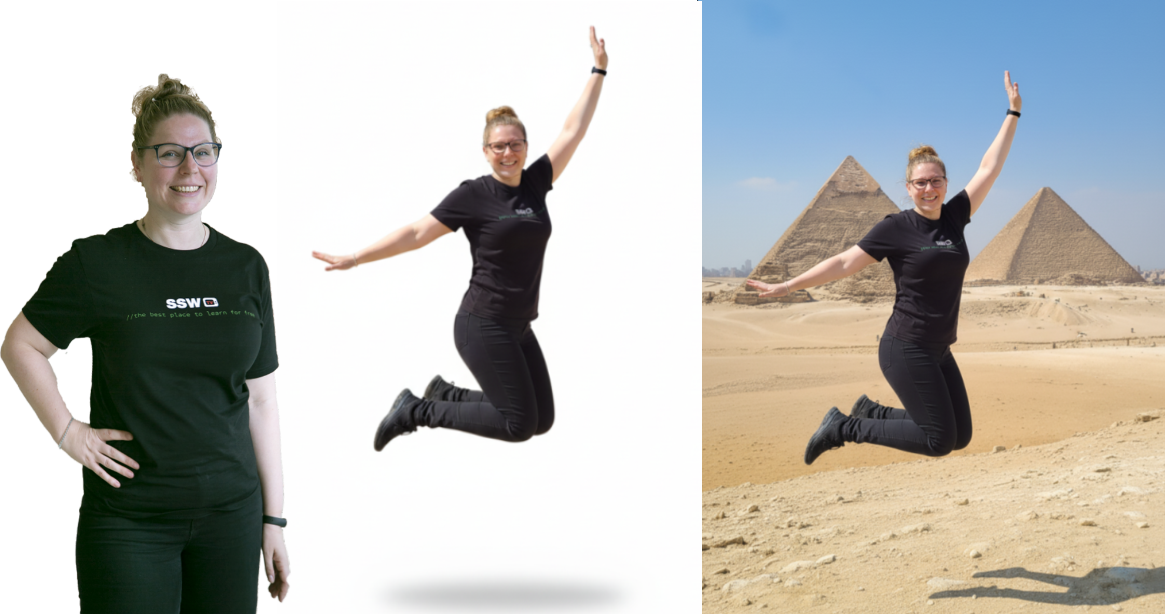
I recently asked the team at SSW to generate images of themselves using an existing photo, some were quite amusing, but they are also scary accurate.
#2 – Midjourney v6
Gen Alpha shouldn’t be afraid of its name, there is nothing mid about Midjourney! 🤣 It’s best used for hero, stylised key art with minimal edits.
Why like it:
- Outstanding images – The prettiest renders for concept art, moodboards, thumbnails, and hero images.
- Accuracy – Big jump in prompt fidelity and in‑image text compared to early versions.
- Easy to use – Handy editing tools (Zoom, Pan, Vary Region) for targeted fixes.
- Quick look‑development – you can spin up 12 ideas in 10 minutes and pick a direction before committing to final assets.
Cons:
- Discord Centric – while there’s a web editor now, Discord has more options.
- Less Privacy – your generations are public by default unless you use Stealth Mode correctly (and “private” images may still be visible in shared spaces unless you generate in DMs/private servers).
- Inpainting is good, not Photoshop-grade. The Vary Region (inpaint) tool is handy for tweaks, but precision edits can be hit-and-miss; many designers still finish surgical fixes in Photoshop.

#3 – OpenAI Images (DALL·E 3 / GPT‑4o Images)
Best known for prompt fidelity, legible typography, and chat‑first iteration in ChatGPT, Open AI images makes AI-generated images really accessible.
Why I like it:
- Accuracy – Excellent at getting the brief right (multi‑step, chatty refinement).
- Generates Text – Strong in‑image text (poster titles, signage) and designs from existing images.
- Fast compositing – E.g. “Combine this product PNG + this background + this lighting brief.”
Cons:
- Speed – Ultra‑specific realism can be slower than purpose‑built art models; be patient
- Precision – Editing is not Photoshop grade; retouch the images
- Brand consistency – Character likeness, props, and lighting can drift across batches.
Final thoughts
The winners aren’t the teams with the fanciest model, they’re the ones who standardise a workflow that designers love. Pick one tool for photo edits (Nano Banana), one for look‑dev (Midjourney), and keep ChatGPT’s Images handy for typography‑heavy images. Then document your AI processes in your design system and ship more with consistency.
What do you think of using AI in your design workflows? Have you had any good or bad experiences with AI images? I’d love to hear them. Drop me a comment below. 👇
July 5, 2026 @ 8:14 PM
Adam, your top 3 AI image generator list is a great starting point for any designer looking to integrate generative AI into their creative process. The way you’ve highlighted the specific strengths of each tool—from artistic flair to photorealism—is very helpful. In late 2025 and moving into 2026, we’re seeing that the next level of efficiency for designers and developers alike is programmatic control over these models. That’s why we’ve been building Pixapi, which provides a unified visual AI API for image generation, editing, and async video generation. It essentially allows teams to integrate these powerful creative tools directly into their backend workflows via a single API. This unified approach really helps in maintaining brand consistency across large-scale projects. I completely agree that designers should embrace these tools rather than fear them. Among the generators you listed, which one do you think offers the most reliable results for consistent brand-specific characters? Thanks for sharing your top picks!
July 11, 2026 @ 1:28 PM
Really great comparison of AI image generators. I would also add pictro.ai to the list – it offers excellent quality for photorealistic image generation and has been my go-to tool for design projects. The prompt engineering tips you shared are very practical.
July 23, 2026 @ 2:29 PM
Great roundup of AI image generators. For designers who need precise text rendering in generated images (think posters, infographics, UI mockups), newer models with 4.5K token context and ~10px text fidelity are worth exploring. The gap between “pretty picture” and “production-ready output” is finally closing.
August 5, 2026 @ 2:30 AM
As a designer, this matches my experience—AI tools are great for quick variations and mock-ups, but they still need human judgment for final polish. The SynthID point is a good reminder; knowing the origin of generated assets is becoming essential for client work. I’d add that the “design is over” hype ignores how much taste and accessibility still matter.
August 11, 2026 @ 10:05 AM
This was an interesting read. It reminded me how small details and consistency can shape a long-term project, much like the progression systems in a football career simulator I have been testing recently.
August 15, 2026 @ 8:02 PM
Thanks for sharing this! Really useful perspective.
August 15, 2026 @ 10:20 PM
Love how you broke this down step by step.
August 15, 2026 @ 10:22 PM
Good stuff! Shared this with a friend who’d find it useful.
August 15, 2026 @ 11:07 PM
Love how you broke this down step by step.
September 6, 2026 @ 7:01 PM
Good picks – I have been recommending the same shortlist to teams, with one caveat: which generator wins changes depending on whether you are producing one-off concepts or maintaining a consistent design system across hundreds of assets. Character consistency and prompt adherence matter far more at scale than in demos.
The point I keep adding for designers who ship these into products: pay attention to how the underlying API is billed. A generator can look cheap per image and still surprise you – token-based pricing is hard to forecast, and some gateways charge for failed or filtered generations. The workflow only became budget-friendly once we used an API that shows flat credits before each call and does not deduct on failure. That predictability matters more than model choice once design ops scale. Do you use any of the three through their API, or all via web apps?
September 11, 2026 @ 11:26 AM
Thanks for the comparison! I have been testing AI image generators for product mockups lately, and the difference in control over composition really stands out. The tip about evaluating output consistency before adopting a tool is spot on.